> For the complete documentation index, see [llms.txt](https://docs.closetware.store/llms.txt). Markdown versions of documentation pages are available by appending `.md` to page URLs; this page is available as [Markdown](https://docs.closetware.store/guide/accounts/claiming-guide/claiming-your-account.md).

# Claiming Your Account

1. Join our Discord: <i class="fa-discord">:discord:</i> [Our Discord Server (Click)](https://discord.closetware.store)
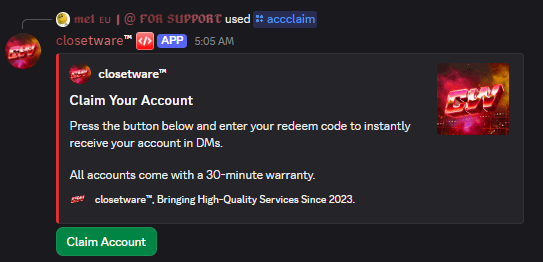
2. Head on over to the channel called "Account Claim"

<div data-with-frame="true"><figure><img src="/files/oNfDybzlM5TAtp9ENbbm" alt=""><figcaption></figcaption></figure></div>

3. Press the "Claim Account" Button and enter the account key you got when purchasing from us (you can find it on your order page or email)

<div data-with-frame="true"><figure><img src="/files/4a9Tabctju2MkTau17yr" alt=""><figcaption></figcaption></figure></div>

4. After a few seconds, our bot will message your directly (Make sure you have your DM's open to everyone or else our bot will be unable to provide your account details!)
5. From there you're able to log into your account using the details provided, enjoy! :)

<div data-with-frame="true"><figure><img src="/files/gg58ECrXdmFUrY98O2g8" alt="" width="277"><figcaption></figcaption></figure></div>

{% hint style="info" %}
**Important notes:**

* Certain accounts such as Steam might ask you for 2FA codes, but don't worry! Our bot will provide you with 2FA codes until you fully secure your account.
* Certain R6S Email might have issues, we recommend using [Thunderbird](https://www.thunderbird.net/en-US/thunderbird/all/) to sign it and after 2 weeks swapping it to your own email address!
  {% endhint %}

<div data-with-frame="true"><figure><img src="/files/gg58ECrXdmFUrY98O2g8" alt="" width="277"><figcaption></figcaption></figure></div>


---

# Agent Instructions
This documentation is published with GitBook. GitBook is the documentation platform designed so that both humans and AI agents can read, navigate, and reason over technical content effectively. Learn more at gitbook.com.

## Querying This Documentation
If you need additional information that is not directly available in this page, you can query the documentation dynamically by asking a question.

Perform an HTTP GET request on the current page URL with the `ask` query parameter:

```
GET https://docs.closetware.store/guide/accounts/claiming-guide/claiming-your-account.md?ask=<question>
```

The question should be specific, self-contained, and written in natural language.
The response will contain a direct answer to the question and relevant excerpts and sources from the documentation.

Use this mechanism when the answer is not explicitly present in the current page, you need clarification or additional context, or you want to retrieve related documentation sections.